
Premium Report - Dead Stock Products/Variants
Dead Stock Products/Variants
Dead Stock reports are useful to see which items have not been selling over a given time period.
This report follows a similar format to our other Product and Variant reports, but has a number of filters and settings to narrow it down exclusively to Products Not Sold.
Note - The Dead Stock Products/Variants reports are both very similar, it's just one is broken down by products whereas the other is split up into individual variants.
By default the reports are set to look at only Products/Variants Not Sold in the last 365 days (see the date range, top right). You can of course adjust this however you like.
As Premium Reports, these are available on all Paid Plans of Report Toaster. If you aren't signed up, follow these steps here to upgrade your account.
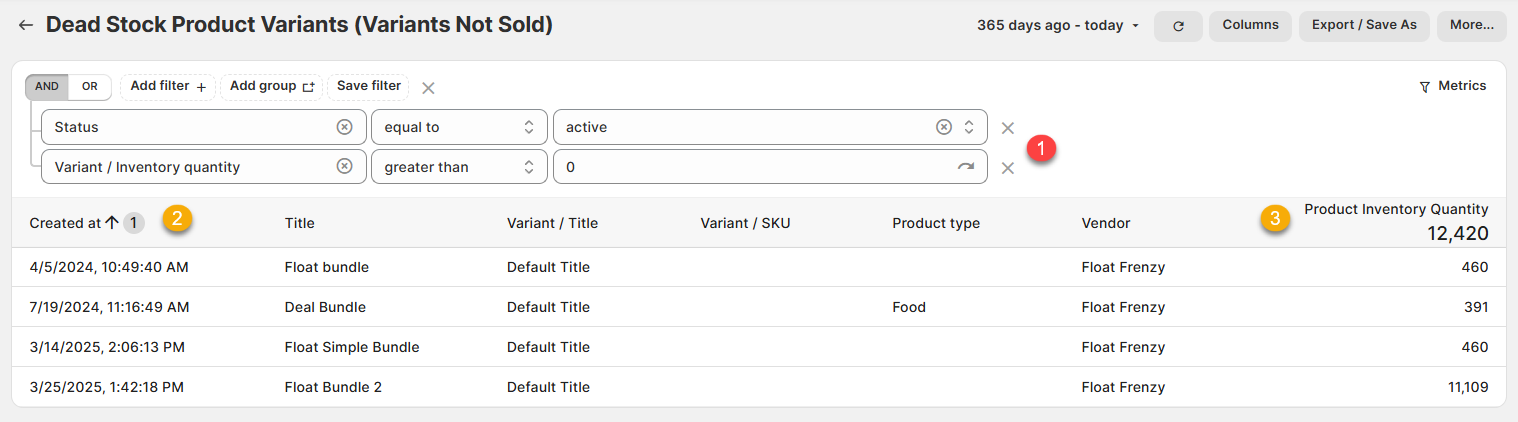
Let's look at the Dead Stock Variants report:
(click image to enlarge)
Here are a few terms to be familiar with in order to understand the Dead Stock Variants Report:
1.) Status, equal to, active. Variant / Inventory Quantity, greater than, 0 (FILTER): This Filter setting ensures that only currently active products (i.e. not draft) that you have stock of appear in the report.
2.) Created at: The date and time for when the Product/Variant was originally created.
This is important because to properly gauge whether an item is not telling, you need to know how long ago it was made
For example, we can see here that the Float bundle was created back on 4/5/2024. This is over 1 year ago and it has had no sales since.
3.) Product Inventory Quantity: The amount you currently have in stock of that particular Product/Variant
For example, I have 460 units of that Float bundle available.
Like all Report Toaster reports, these reports are fully customizable - so you can adjust the date range, add/remove columns, introduce a filter or change the sort to suit your individual needs. See our basic guides here for more info.
For other premium reports you can be added to your account, check out our main guide here.